

Quick Reference for AI Agents & Developers
- Purpose: Keep real-time connection alive when app enters background
- Enable: Add Background Modes capability → Enable “Background fetch” and “Remote notifications”
- Behavior: Maintains connection for a few seconds in background
- Use case: Update UI with new messages when switching between apps
- Related: Connection Status · WebSocket Connection

Background updates behaviour
This below table is applicable only when these steps are followed. autoEstablishSocketConnection usage can be found in Managing Web-Socket connections manually.| Value | Behaviour | |
|---|---|---|
| autoEstablishSocketConnection | true | Connection is maintained in background for 30 seconds and after that it is killed. |
| autoEstablishSocketConnection | false | 1. If CometChat.connect() is called and app goes to background the connection is maintained for 30 seconds and after that connection is terminated. 2. If CometChat.disconnect() is called and app goes to background the connection not maintained. |
Step 1. Add Background Modes in Capabilities
Click on Targets -> Project -> [+ Capability] -> Add ‘Background Modes’ section.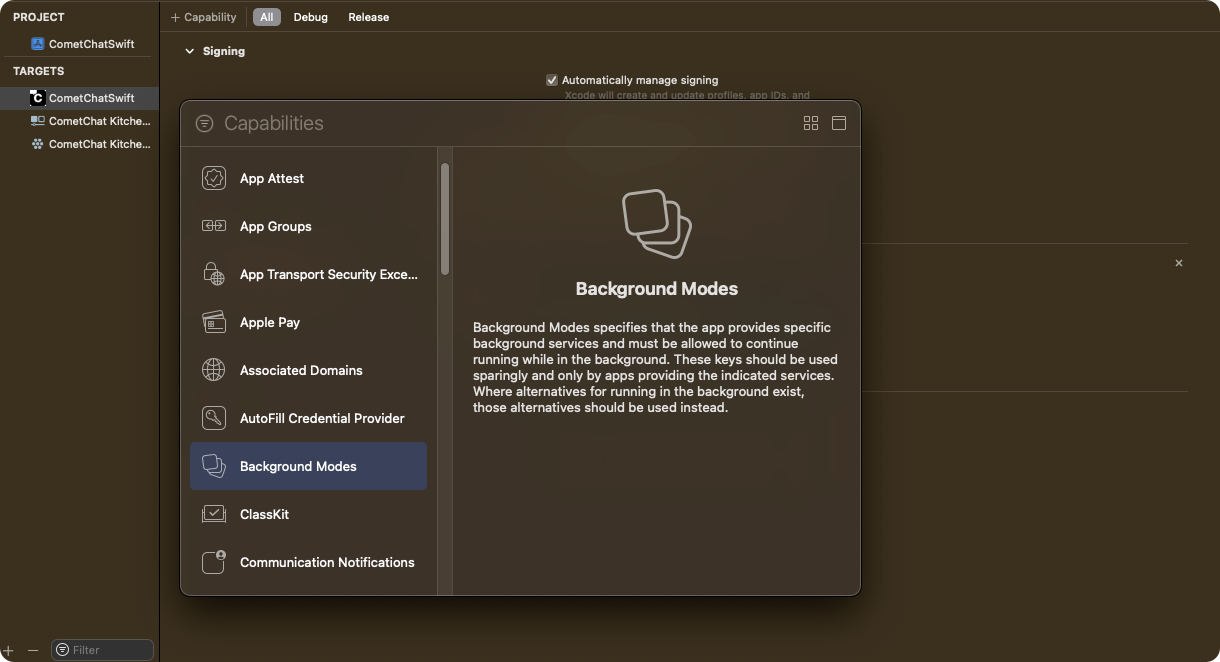
Step 2. Select Background modes for processing
Select ‘Background Fetch’ and ‘Background Processing’ options by ticking them.
Step 3. Add Code in Application class to configure background services for different states.
AddCometChat.configureServicesmethod in application class or scene delegate class as shown below.
- Swift
Sample Payload - CometChat.configureServices() Input
Sample Payload - CometChat.configureServices() Input
Method Signature:
ApplicationState Enum:
Application Lifecycle Events:
Background Task Lifecycle Flow:
Connection Behavior Based on autoEstablishSocketConnection:
Related Configuration:
| Parameter | Type | Description |
|---|---|---|
| Input | ApplicationState | App lifecycle state enum value |
| Returns | Void | No return value |
| Value | Description |
|---|---|
| .willResignActive | App is about to move from active to inactive state. Called when user presses home button or receives interruption |
| .didBackground | App has fully entered the background state. Called after transition is complete |
| Event | UIApplication Method | CometChat Configuration |
|---|---|---|
| App becoming inactive | applicationWillResignActive(_:) | CometChat.configureServices(.willResignActive) |
| App entered background | applicationDidEnterBackground(_:) | CometChat.configureServices(.didBackground) |
| Step | Event | Action | Description |
|---|---|---|---|
| 1 | User presses home button | applicationWillResignActive called | App begins transition to background |
| 2 | Transition completes | applicationDidEnterBackground called | Background task starts |
| 3 | Background task runs | WebSocket connection maintained | Connection kept alive for ~30 seconds |
| 4 | Timeout reached (~30s) | System terminates task | Connection terminated by iOS |
| autoEstablishSocketConnection | Background Behavior |
|---|---|
true | Connection maintained for 30 seconds, then killed automatically |
false + CometChat.connect() called | Connection maintained for 30 seconds, then terminated |
false + CometChat.disconnect() called | Connection not maintained in background |
| Setting | Location | Description |
|---|---|---|
| autoEstablishSocketConnection | Managing Web-Socket connections manually | Controls automatic socket connection behavior |
| Background Modes | Xcode Capabilities | Must enable “Background fetch” and “Background Processing” |
- As per the iOS standard guidelines, this service will keep alive for few seconds in background services in the system. After few seconds it will get terminated automatically by the system.
- This service is only available after SDK v4.x.x & UI Kit v4.x.x
Step 4. Check background service is running
You can check the background service is running or not usingCometChat.BackgroundTaskEnabled() method. It will return true if service is running else it will return false.
- Swift
Sample Payload - CometChat.backgroundTaskEnabled() Output
Sample Payload - CometChat.backgroundTaskEnabled() Output
Method Signature:
Return Values:
Usage Scenarios:
Integration with UI Components:
Conditional Refresh Pattern:
Related Methods:
| Parameter | Type | Description |
|---|---|---|
| Input | None | No input parameters |
| Returns | Bool | Background task running status |
| Return Value | Type | Description |
|---|---|---|
true | Bool | Background service is running, real-time updates are active |
false | Bool | Background service is stopped, manual refresh required |
| Scenario | backgroundTaskEnabled() | Recommended Action |
|---|---|---|
| App just entered background | true | No action needed, UI updates automatically |
| Background timeout reached (~30s) | false | Refresh messages/conversations when app returns to foreground |
| User switches apps quickly | true | Real-time updates continue seamlessly |
| App in background > 30 seconds | false | Call refresh APIs on viewWillAppear or applicationDidBecomeActive |
| State | UI Behavior | Recommended Implementation |
|---|---|---|
true | Messages and conversations update in real-time | No additional action required |
false | UI may be stale | Show refresh indicator or auto-fetch on viewWillAppear |
| Step | Check | Action |
|---|---|---|
| 1 | viewWillAppear called | Check CometChat.backgroundTaskEnabled() |
| 2 | Returns false | Call MessagesRequest.fetchPrevious() or ConversationsRequest.fetchNext() |
| 3 | Returns true | Skip refresh, real-time updates are active |
| Method | Description | Link |
|---|---|---|
CometChat.configureServices(_:) | Configure background services | See Step 3 above |
CometChat.connect() | Manually establish WebSocket connection | Managing Web-Socket connections manually |
CometChat.disconnect() | Manually close WebSocket connection | Managing Web-Socket connections manually |
CometChat.getConnectionStatus() | Get current connection status | Connection Status |